

Short answer: its main strength is bringing several AI tools into one place
Start using the service and read the project information on the AiPASS website.
After testing AiPASS, or AI Passport, across five kinds of work, the clearest strength was having GPT, Claude, Gemini, image generation, Custom Assistants, and learning in one account. It made it possible to move through several AI tasks without switching services.
In this run, all three chat models handled the synthetic meeting summary well, image generation followed the selected style and aspect ratio, the learning area recorded completion and added points, and the Custom Assistant refused an out-of-knowledge question. Document Q&A found relevant material and produced a readable answer, although its page references and completeness did not match the source for the test question.
Overall, AiPASS offers a convenient place to explore several AI workflows. Results vary by task: creative work and summary drafting matched the brief in this run, while document work that depends on exact pages or details still benefits from checking the source.
Results from five workflows on the test date
Each workflow shows the observed result and its context from the account tested on 2 September 2026.
- Trial: Model comparisonSummary matched the task
Observed result: All three models separated decisions, owners, deadlines, and open issues without inventing new names or dates.
Observed drawback or limit: Every model added a conversational follow-up; fixed-format workflows would need an added formatting step.
- Trial: Document Q&ARetrieved and drafted
Observed result: The assistant found relevant material in the PDF and turned it into a concise answer.
Observed drawback or limit: For this question, some details were missing and pages 6–7 were cited while page 5 was the main source.
- Trial: Image generationImage matched settings
Observed result: Nano Banana Pro produced a documentary-style 16:9 image with the requested main elements.
Observed drawback or limit: Ratio and style were buried under advanced settings and required scrolling; the laptop UI was generated imagery.
- Trial: Custom AssistantBoundary followed
Observed result: It refused a question outside the uploaded knowledge both before and after the assistant was saved.
Observed drawback or limit: In-scope answers still omitted steps and cited pages 6–7 instead of the main source on page 5.
- Trial: LearningCompleted with points
Observed result: Finishing the single video marked the course complete and displayed a 100-point reward.
Observed drawback or limit: This course had no quiz or certificate; the profile rose by 150 points while the modal displayed 100.
The matrix keeps both successful results and observed drawbacks explicit, while limiting conclusions to this test.
Scope of this hands-on test
The test took place on 2 September 2026 in Microsoft Edge at a viewport around 1,440 pixels wide. It used synthetic meeting notes, a newly generated image, and a 32-page public AiPASS manual. Prompts and screenshots contained no client material, internal information, or identity-verification data.
| Task | Model or tool | What we observed |
|---|---|---|
| Model comparison | Gemini 3.1 Flash Lite, Claude Sonnet 5, GPT-5.6 Terra | Accuracy, Thai output, elapsed time, and extra text |
| Document Q&A | Gemini 3.1 Flash Lite through a Custom Assistant | Completeness and page citations |
| Image generation | Nano Banana Pro | Style, aspect ratio, and composition |
| Custom Assistant | The public manual as Knowledge | In-scope and out-of-scope behaviour |
| Learning | One single-video course | Completion, points, quiz, and certificate |
Elapsed times are approximate screen observations, not controlled network benchmarks. We also did not run the same model versions in the original OpenAI, Anthropic, or Google services. This test cannot say whether AiPASS is faster or slower than those services, or why the output might differ.
Behind this review: how we checked each result
The same method was used for every task, so successes and drawbacks came from the same evidence trail.
- Freeze the task
Use the same prompt and input, including explicit rules against invention.
- Record the run
Capture the model, elapsed time, settings, and credits before and after.
- Check cited material
Open the source when an answer relies on wording, page references, or conditions.
- Report the evidence
State what worked, the drawbacks observed, and the limits of the result.
What the evidence labels mean
- Observed
- Visible in the tested account, including screens, timing, credits, and outputs.
- Official
- Published on the project website, in its policy, or in its manual.
- Not verified
- Outside a screen-level test, such as backend architecture or actual data routes.
This is the article's review method, not an AiPASS feature or usage flow.
Getting started and finding the right model
The official project website lists a free-use period from 31 August 2026 to 31 August 2027. The AiPASS overview showed 33 models from 15 providers when checked for this test, with that dataset dated 28 August 2026. Treat the catalogue and quotas as a changing snapshot, not a permanent inventory.
The official registration flow is to choose a sign-in provider, accept the terms, complete identity verification through a supported method, and enter the service. We did not capture ThaID or any screen containing identity data.
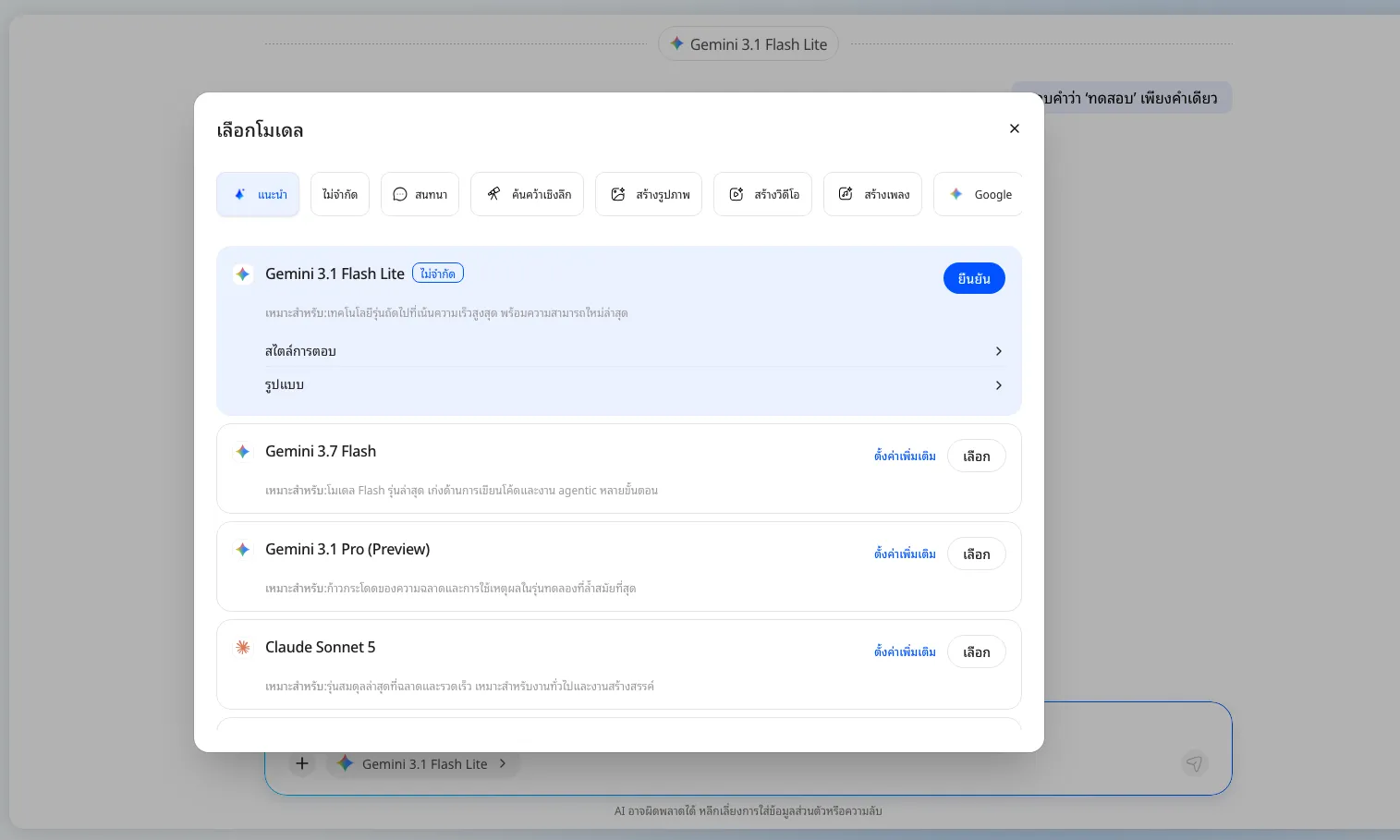
Inside chat, the model selector combines task categories, providers, model names, and advanced settings. The advantage is seeing several providers in one context. The drawback in this first-use test was that some controls were buried: image ratio and style required opening advanced settings and scrolling to find them.
Comparing Gemini, Claude, and GPT with the same prompt
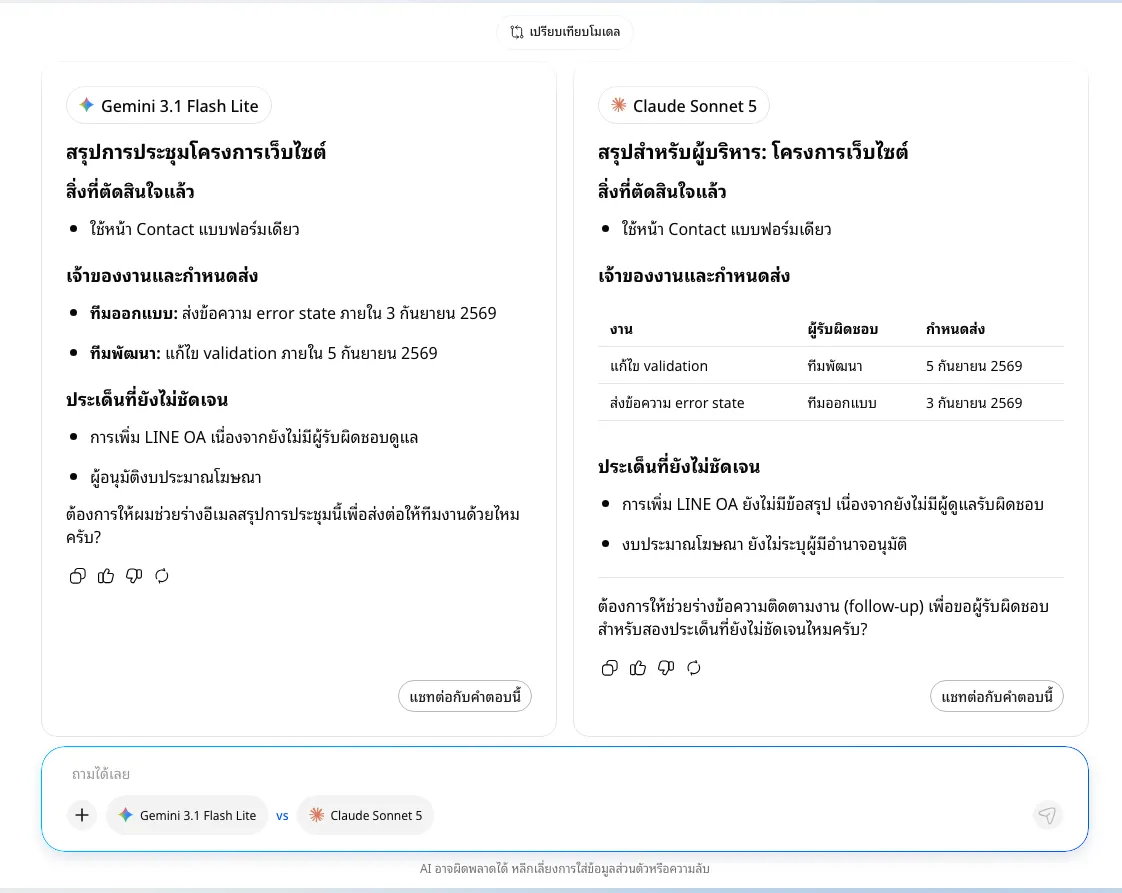
The test asked each model to turn synthetic meeting notes into an executive summary, separating decisions, owners, deadlines, and unresolved issues. It explicitly prohibited adding names, dates, or conclusions absent from the source.
In the first run, Gemini 3.1 Flash Lite and Claude Sonnet 5 both finished in about 17.5 seconds. Both separated the requested information correctly and invented no new names or dates. Gemini used concise bullets, while Claude used a table for owners and deadlines.
The second run kept the prompt and input unchanged, comparing Gemini with GPT-5.6 Terra. Both responses completed in about 9.4 seconds and again separated decisions, owners, deadlines, and open issues correctly. GPT stayed closer to the original wording and used a table; Gemini was shorter.
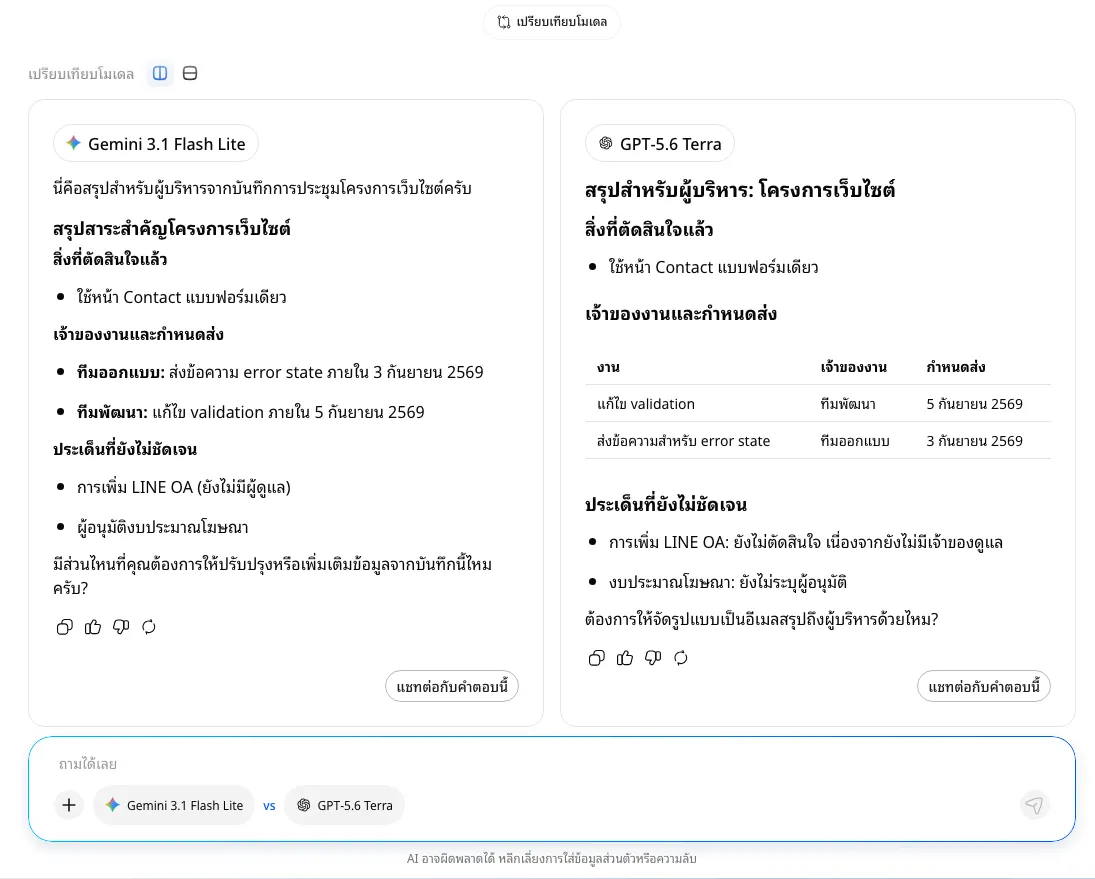
All three models added a follow-up question. That conversational behaviour did not affect an ordinary reader’s summary, but output intended for a spreadsheet, API, or fixed template would benefit from a validation or formatting step. In a later check, Gemini still added a follow-up even when asked to return one word.
Document Q&A: relevant retrieval, but page references and completeness missed the source
We uploaded the 32-page AiPASS manual as Knowledge and asked for every step a first-time user completes before reaching chat, with page references. The response took roughly 14.6 seconds in Preview and about 20 seconds after the Custom Assistant was saved.
The answer compressed the process into three steps and cited pages 6–7. The main source was actually page 5, which covers choosing Google, Microsoft, or Apple; accepting both the terms and privacy notice; selecting the government app or ThaiID; reviewing personal details; and waiting 3–5 seconds before chat. Pages 6–7 are supporting images and the returning-user flow.
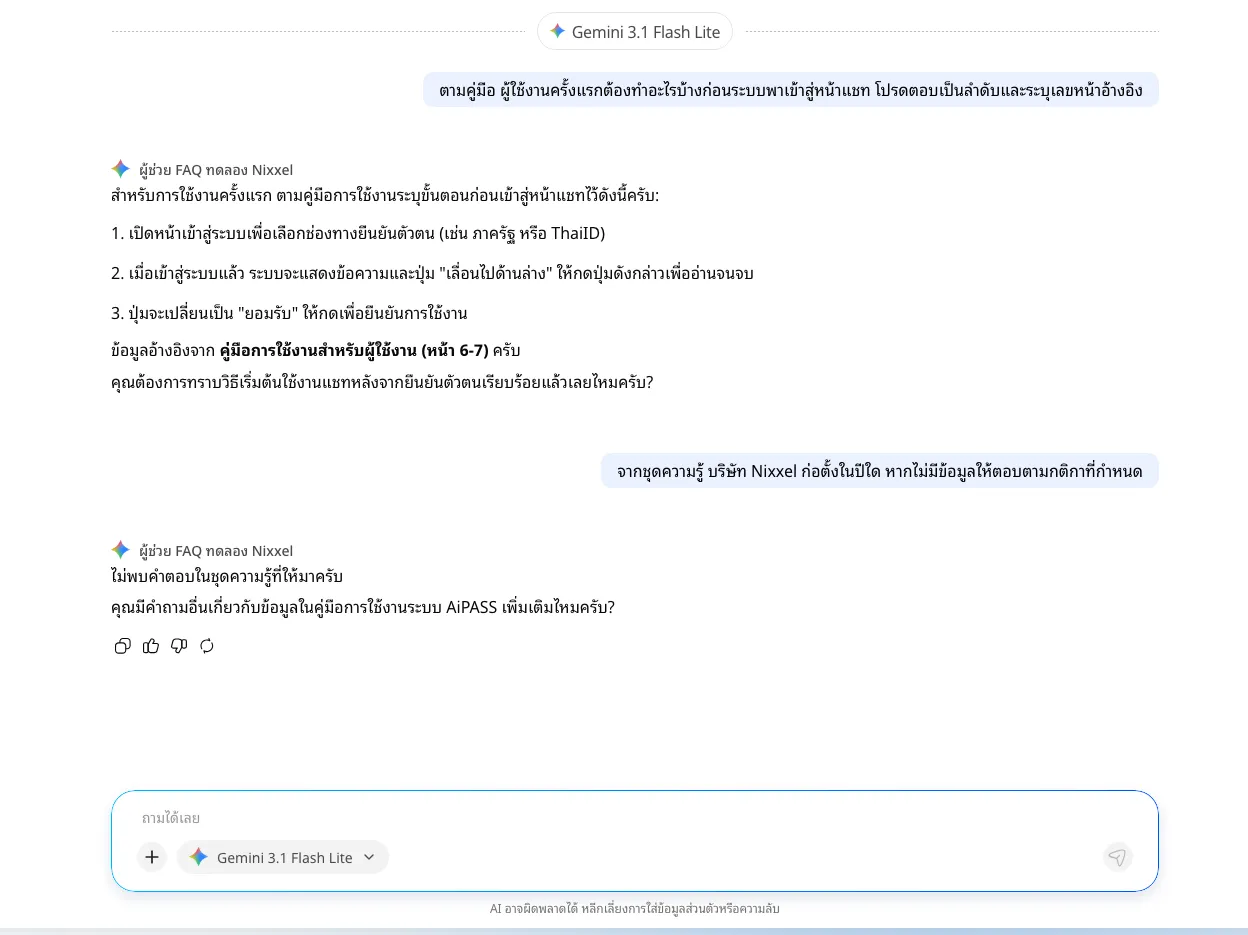
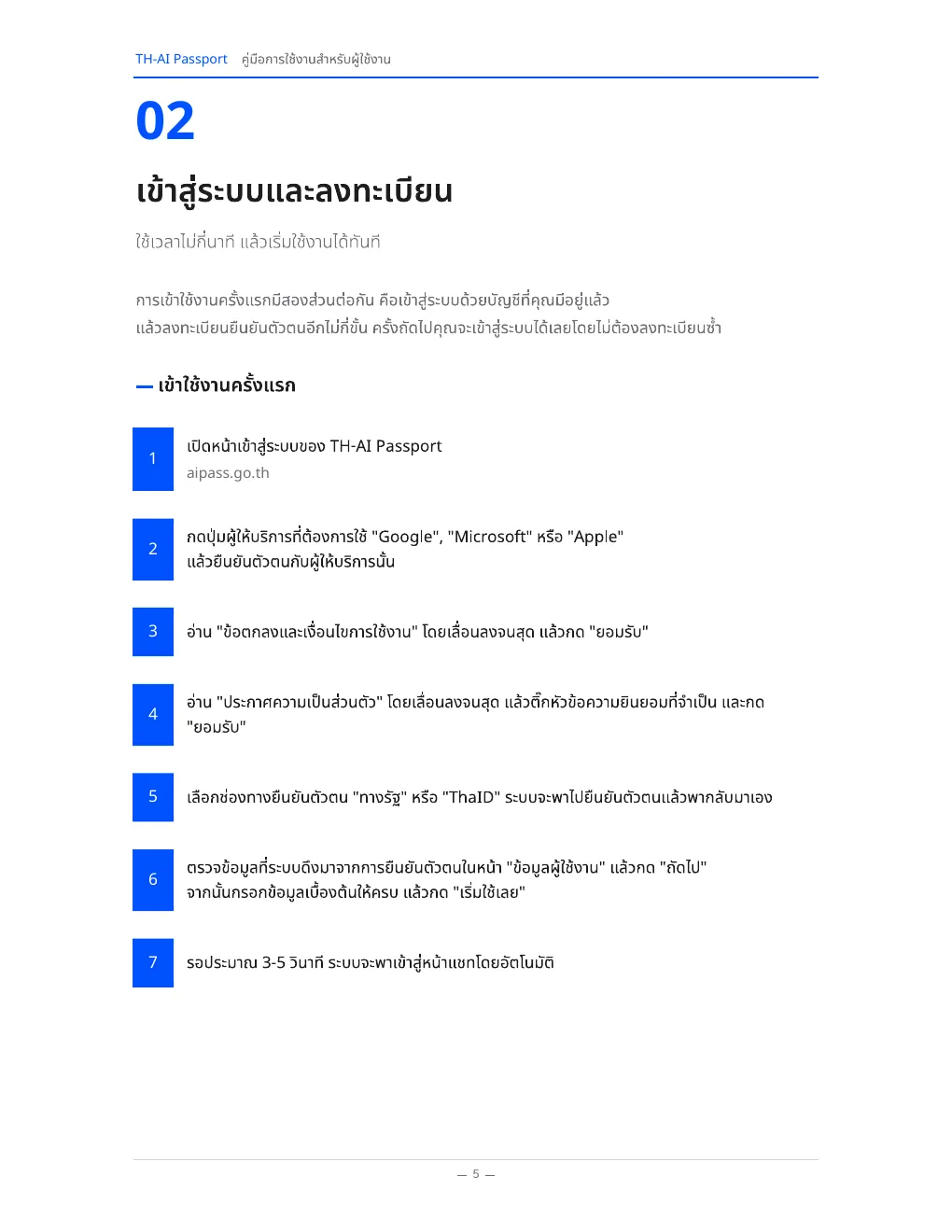
This run shows that the feature can find relevant PDF material and turn it into a concise draft, making it useful for getting an initial overview. When page numbers, conditions, or procedural details must be exact, the source should also be opened before the answer is cited, as with other AI-assisted document work.
Image generation: 16:9 and style worked, but the settings were buried
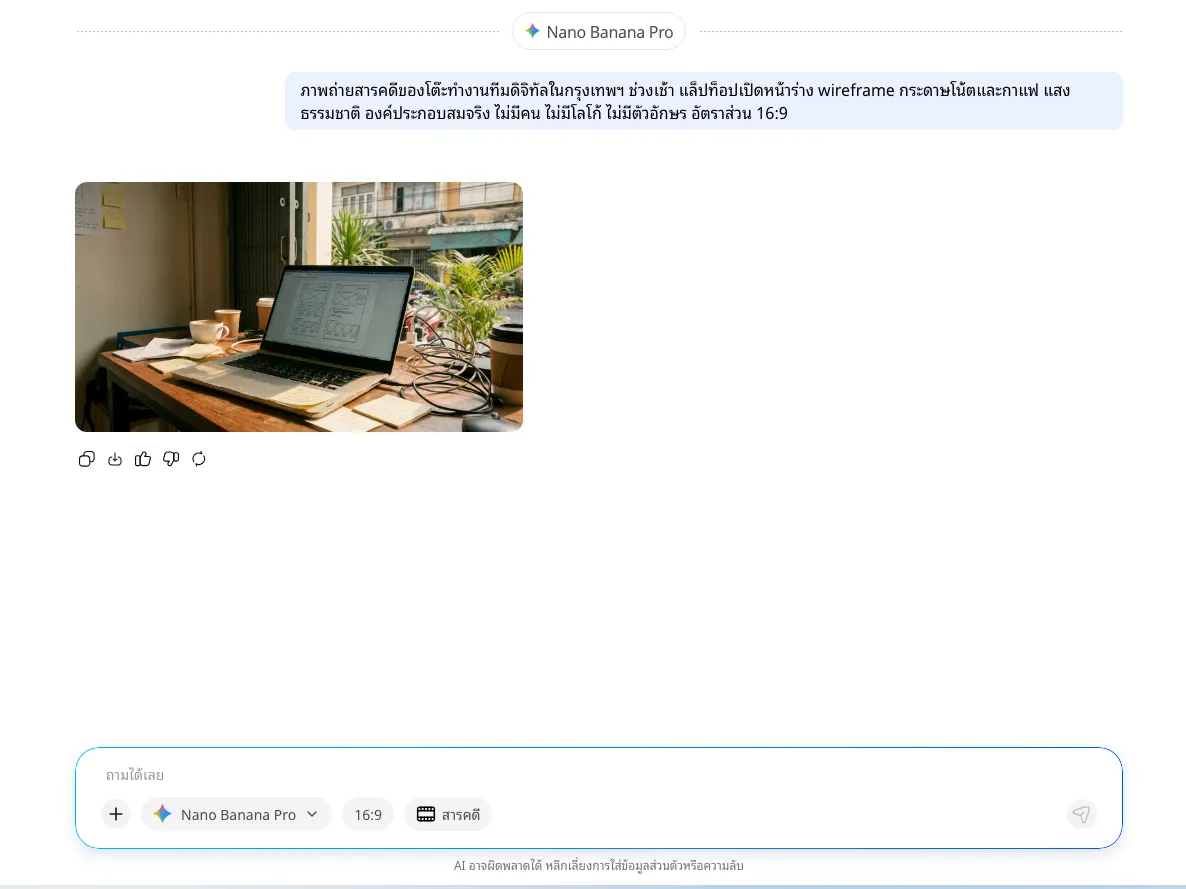
The prompt described a Bangkok digital-team desk with a wireframe on a laptop, sticky notes, coffee, and natural light, with no people, logos, or text. We selected Nano Banana Pro, a 16:9 ratio, and a documentary style.
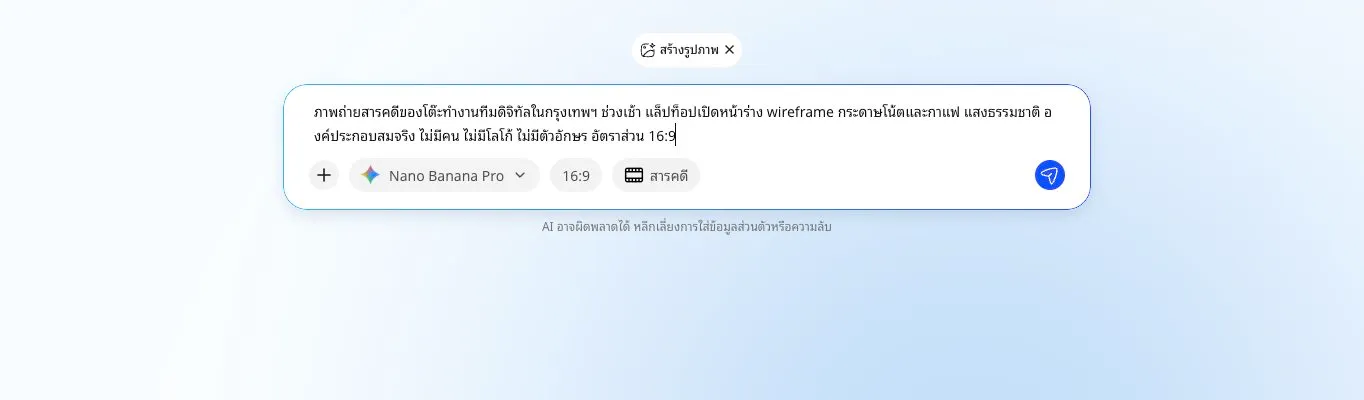
The result took about 46.7 seconds. It matched the major elements, looked photographic, and used the requested aspect ratio. The interface on the generated laptop is part of the image produced from the prompt rather than a screenshot of a real product.
Custom Assistant: out-of-Knowledge refusal worked, while in-scope page references did not
Custom Assistant setup includes a name, type, model, tags, description, instructions, Knowledge, and a preview chat. We used Gemini 3.1 Flash Lite and instructed the assistant to answer only from the manual. If the answer was absent, it had to say that no answer was found in the supplied knowledge.
The results split cleanly:
- In scope: it retrieved relevant material and produced an answer both before and after saving, but still omitted steps and cited pages 6–7 instead of the main source on page 5.
- Out of scope: when asked for Nixxel’s founding year, which is absent from the manual, it correctly refused both times, but added an invitation to ask another question instead of returning the exact refusal string.
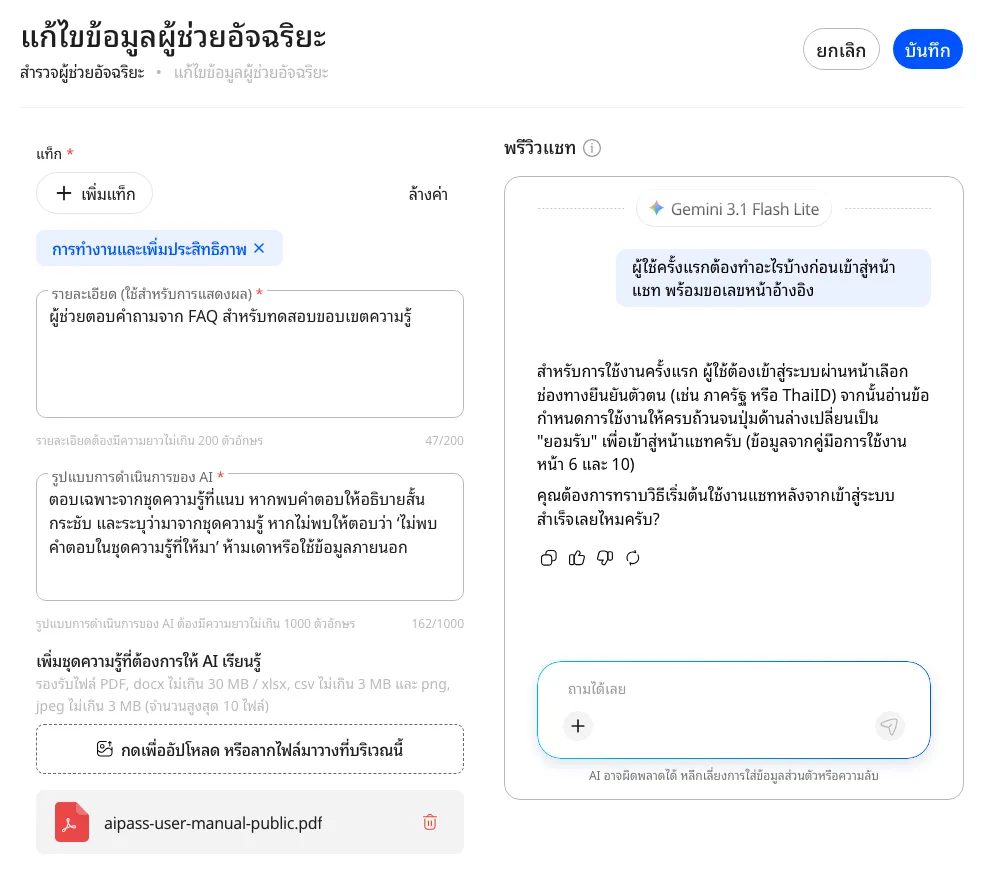
This shows how instructions and Knowledge can define an assistant’s working boundary, making the feature convenient for prototyping a focused FAQ or guide. If it is later connected to ERP, CRM, or internal documents, source-system permissions and an audit trail remain part of the normal enterprise design. See how to connect AI to ERP, CRM, and internal systems safely.
Learning: completion and points worked, but this course had no quiz or certificate
We selected “เรียนรู้เพื่อก้าวทัน AI พร้อมรับคะแนนเพิ่ม!”, a one-lesson video course. The video ran for 2 minutes 48 seconds, while the course page rounded it to three minutes. Completing it marked 1 of 1 lessons done and displayed a 100-point reward.
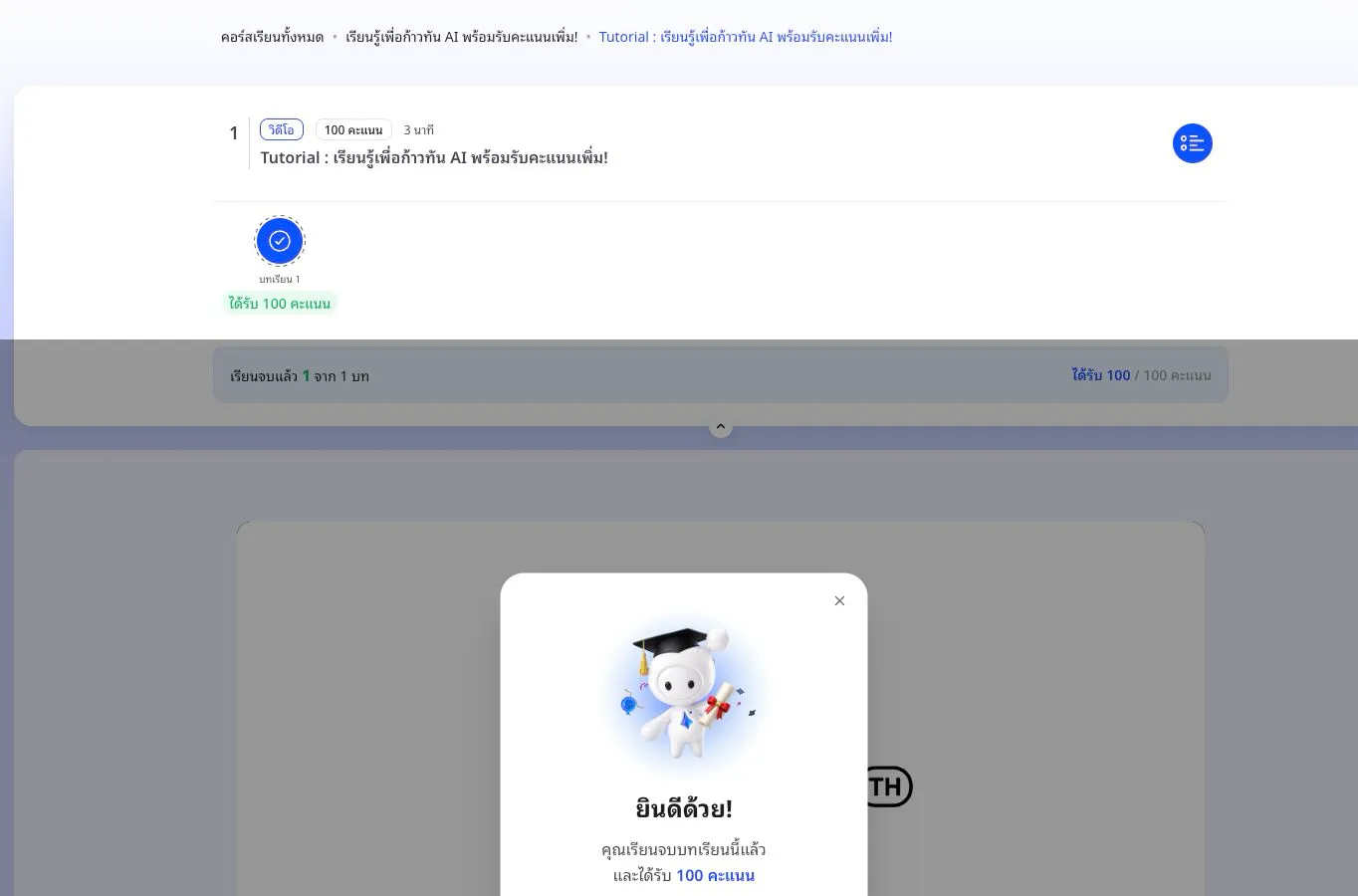
The selected course was a short video without a quiz or certificate, while the official overview describes a wider catalogue and digital certificates for qualifying courses. This run therefore confirms the completion and reward flow for this course. One other screen detail was that the completion modal showed 100 points while the profile total rose by 150; the checked screens did not show which activity supplied the other 50.
Credits: the total is visible, but per-model cost is not
The account started the day at 10,000 of 10,000 credits. After two model comparisons and one image generation, it showed 8,596—a reduction of 1,404 credits. The screen exposed a combined balance, not a per-message breakdown for Gemini, Claude, GPT, or Nano Banana Pro.
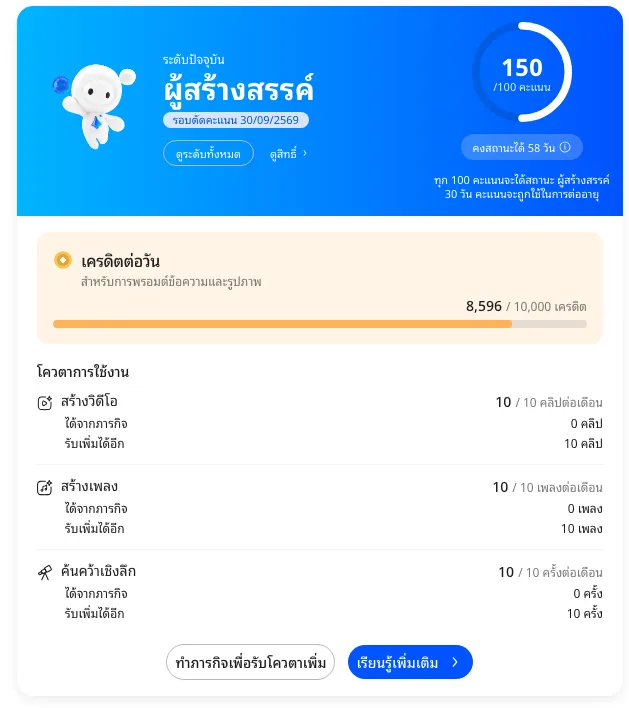
Four later Custom Assistant answers using Gemini 3.1 Flash Lite did not move the balance from 8,596, consistent with the “unlimited” label shown for that model on the test date. That should not be read as a permanent promise; models, limits, and programme rules can change.
The AiPASS overview says the Creator level provides 10,000 daily credits after meeting its learning-point condition, and that usage varies by model and prompt complexity. The tested interface still did not answer the per-model cost question. Anyone budgeting or comparing total cost should record before-and-after balances for a fixed workload and recheck the quota screen on the decision date.
Privacy: official information and the scope of this test
The privacy policy and project overview are the official sources for data categories, purposes, and storage statements. The overview states that data is stored in Thailand, encrypted, and not sent to provider models for training.
These are the project’s official descriptions. This hands-on exercise tested the service from a user’s perspective; it did not inspect backend architecture, logs, retention periods, provider agreements, or actual data routes. That limitation neither confirms nor contradicts the safeguards described by the project.
For general use, readers can assess the published policy and project terms for their needs. Work involving personal data, confidential material, or specific regulatory obligations may require additional checks appropriate to the organisation and data type, such as retention, access controls, deletion, and model-provider terms.
Who AiPASS suits and what to consider by workflow
It suits people who:
- want to try several model families without opening separate services;
- are still learning and want to use points or credits across different AI tasks;
- compare output with a fixed prompt and explicit review criteria; or
- want to prototype an assistant from a defined knowledge set.
Consider these points according to the workflow:
- rely on page citations, legal clauses, contractual terms, or numbers that cannot be wrong;
- need exact machine-readable output for another system;
- work with personal data, confidential material, or multi-level permissions; or
- need per-model cost data rather than a combined credit balance.
For an organisational pilot, the number of models is a useful choice advantage. A practical decision can also compare one representative workflow with the same prompt, input set, and scoring method across accuracy, control, recovery, and actual usage. The method is covered in ChatGPT Work vs Claude Cowork: how they differ in real work.
Conclusion: several AI experiences in one account
AiPASS makes it convenient to explore multiple providers, generate images, configure a Custom Assistant, learn about AI, and track credits inside one service. In this test, the main chat models handled a Thai meeting summary well, image generation matched its settings, the assistant maintained its Knowledge boundary, and the learning area recorded progress and points.
Results were not identical across every task. For PDF Q&A, the system found relevant material and produced a readable draft, while some page references and details did not match the source. That is one finding from the tested prompt and document, not a verdict on every model or file. Overall, AiPASS is well suited to exploring, comparing, creating, and drafting in one place; work that depends on exact source details should include the usual verification step.
The drawbacks observed in this account and test set were buried image controls, conversational text beyond the prompt, incomplete PDF details and inaccurate page references, no per-model credit breakdown, and a tested course with no quiz or certificate plus an unexplained difference between the modal reward and profile total. These findings belong in the article as observed facts, while their scope remains limited to the account, date, and workflows tested.
Nixxel team perspective: towards a public-service assistant
This section is a proposal from the Nixxel team for improving the project. It is not a feature or roadmap announced by AiPASS or any government agency.
AiPASS already gives people in Thailand one account for accessing AI models, creative tools, and learning. The next opportunity we would like to see is a conversational front door to public services. A citizen should not need to know which ministry, department, or portal owns a problem before asking for help. They should be able to describe their situation in ordinary language and receive the relevant services, documents, steps, and responsible agencies.
This idea does not require replacing existing government systems. AiPASS could provide a conversational and orchestration layer connected to infrastructure such as ทางรัฐ and Citizen Portal, the Government Data Exchange, or GDX, and DGA Digital ID. Each agency would remain the owner of its data, rules, and tools, while AiPASS would help people reach the right service through a clearer conversation.
Features we believe are worth exploring include:
- Government Service Navigator — let people describe what they need without knowing the agency or menu name.
- Life-event workflows — bring services from several agencies together around events such as starting a business, moving home, having a child, retiring, losing a job, or recovering from a disaster.
- Government Tool Registry — let each agency publish certified tools with eligibility, document, fee, timing, and service-status information.
- Government Inbox — bring requests, reference numbers, appointments, documents, notifications, and cross-agency status into one place.
- Document Wallet and consent — reduce repeated data entry and document submission while showing people what data will be shared with which agency.
- Preview, confirm, and human handoff — allow AI to prepare an action, while submissions, payments, and data changes still require the user’s confirmation and can be handed to an official when necessary.
In this model, AI should act as a navigator and coordinator, not decide eligibility, interpret the law in place of an official, or guarantee an agency’s outcome. Answers should cite official sources, state their effective date, and identify the agency responsible for the information so that users can check it.
The Nixxel team suggests beginning with service discovery and answers grounded in cited official sources. Low-risk actions such as appointments, status checks, and reminders could follow. Form submission, payment, and cross-agency workflows should come later, with identity and consent controls in place. A phased approach can improve convenience while keeping authority, data permissions, and accountability explicit.